Field visits on Neshan's map, and a technician's day in the shortest order
Connect your Neshan keys and the addresses of customers and field visits are found on the map. Field visits and Team planning show the day's visits on a map, and one click puts a technician's day in the shortest order with the time they should arrive at each customer; the technician sees the same order on My visits.
Product update 3 min read
What changed
- Addresses on the map: the address of every field visit, and of every customer who has one, is looked up on Neshan and kept. A visit at its customer's own address takes the customer's point without a second lookup; an address Neshan cannot place is not asked about again until it changes.
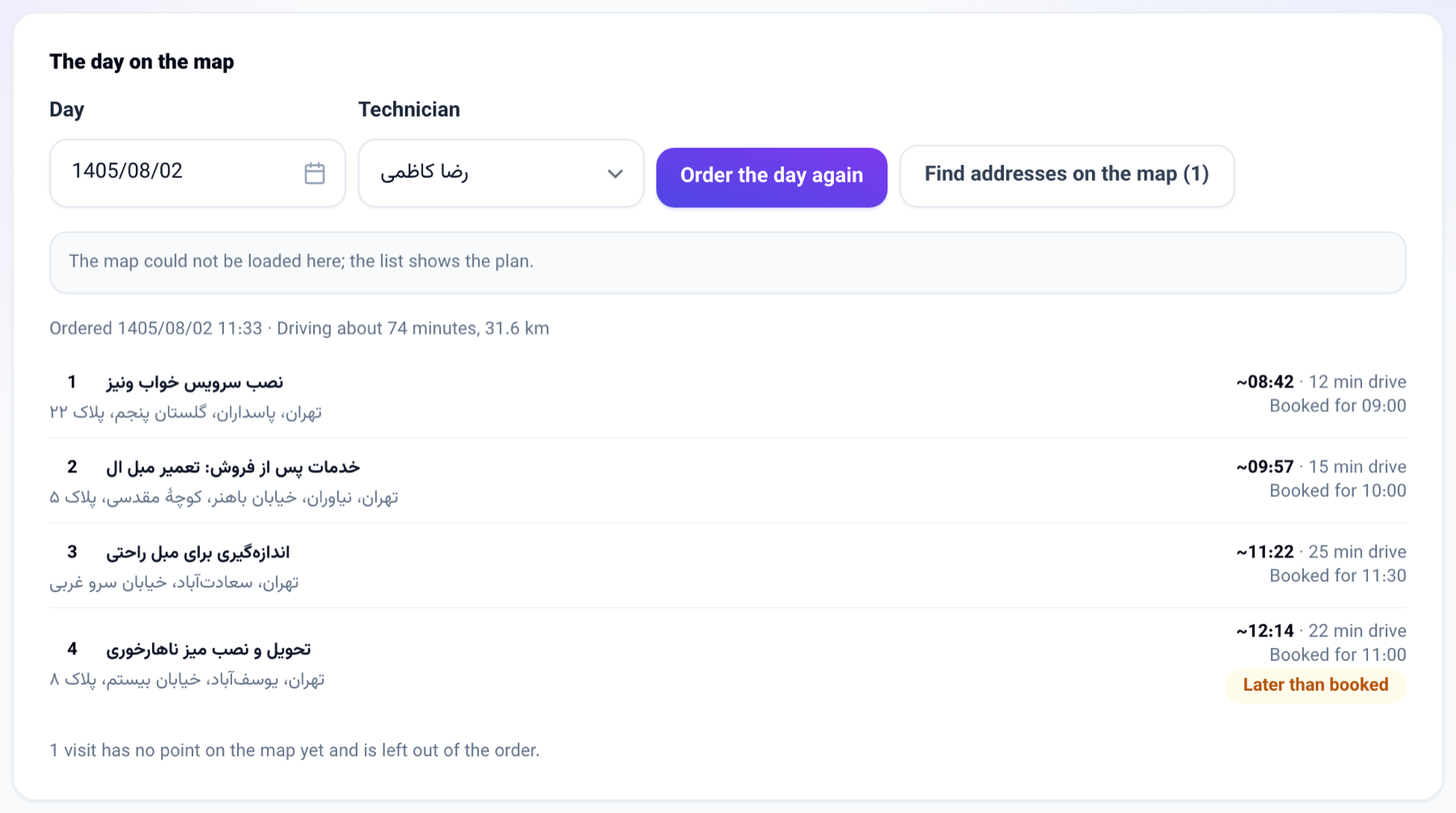
- The day on the map: Field visits and Team planning have a "The day on the map" panel: pick a day and a technician and see their visits on Neshan's map.
- The day in order: "Put the day in order" asks Neshan for the shortest order of that technician's visits, then the drive between them, and shows when they should arrive at each one, with a warning where that is later than the visit was booked for. The order is kept, so My visits on the technician's phone lists the day in the same order with arrival times.
- On the visit and the file: the visit opened on My visits shows its place on the map with an "Open in Neshan" button, and the customer file shows the customer's address on the map under Details.
How to use it
- In your Neshan panel (platform.neshan.org) make a service key and a map key; give the map key your panel's address.
- Open Connections book and go to the "Maps (Neshan)" tab. Tick "Use Neshan maps", type both keys and, if you like, where a technician's day starts (your office) and at what time. Save, then press "Test the key".
- Open Field visits. In "The day on the map", choose the day and the technician and press "Put the day in order".
- The technician opens My visits on their phone and sees the day in that order, each visit with the time to arrive.
Good to know
- Off for every business until its owner turns it on.
- Neshan's services answer only servers in Iran, so lookups and ordering work on the Iranian installation. Anywhere else they fail with a sentence saying so on the settings page, and the visit screens keep working without a map.
- Lookups and ordering are billed by Neshan from your balance there. Addresses are looked up every half hour, a batch at a time; "Find addresses on the map" looks up a day's missing ones at once.
- Without a start point the day starts at whichever visit is best to start from. Visits with no point on the map are left out of the order and counted under the map.
- Who can put a day in order: a seat that plans visits, or the technician for their own day. Changing the settings needs a seat that manages the business.
- The console can read a technician's day, put it in order and find a customer's address on the map.