NabuOS settings now fit on a phone and in a desktop window
The NabuOS settings page was cut off on phones and inside desktop windows; it now opens in full with Save always within reach at the bottom. The panel's top bar stays put while you scroll, and every place you pick the active business now offers Create business too.
Product update 2 min read
What changed
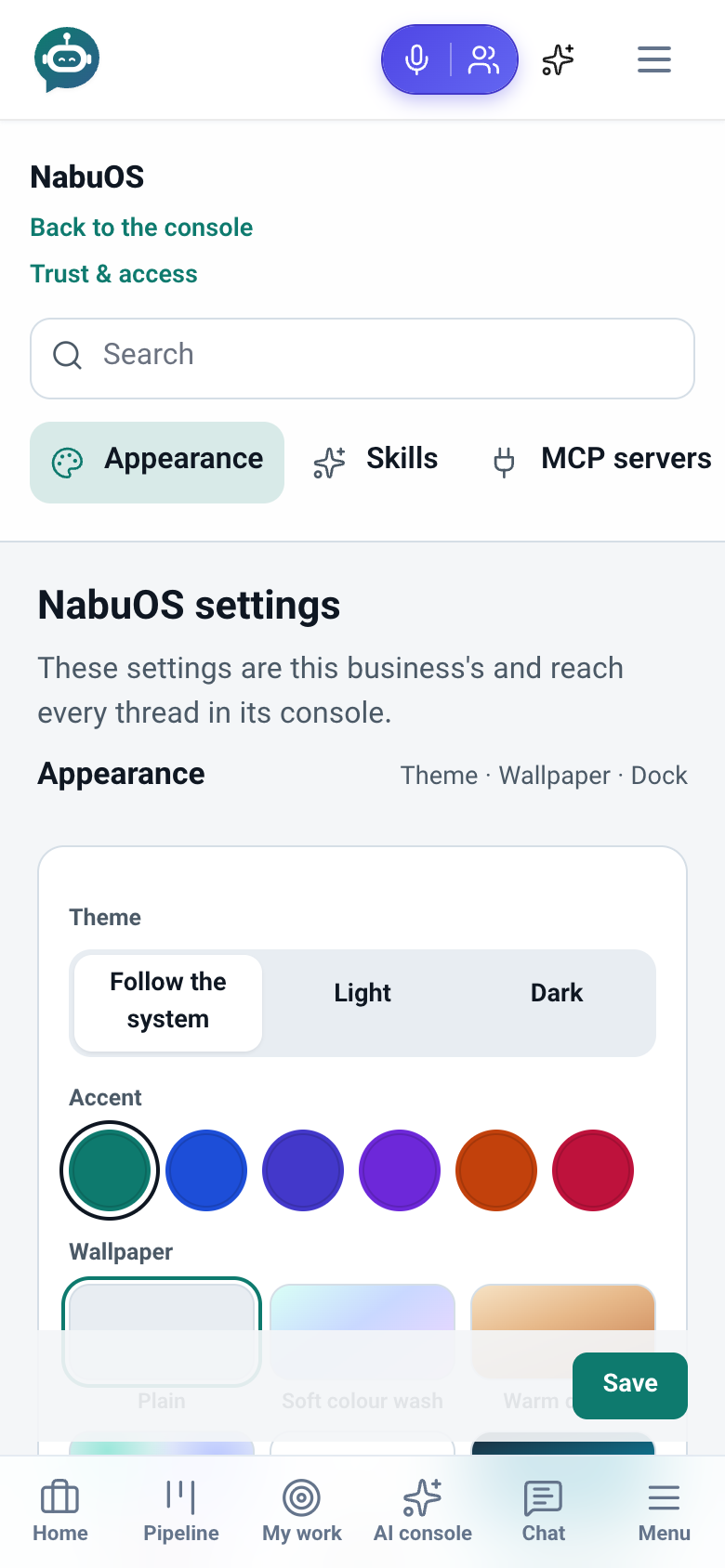
- NabuOS settings are no longer cut off. On a phone and inside a desktop window (the Windows and macOS skins) only the first rows of the settings card showed; the rest, including the panel skin picker, was lost under the edge. The whole page now scrolls normally.
- Save sticks to the bottom. However far down you are, Save is in reach, and on a phone it sits above the bottom bar instead of under it.
- The panel's top bar stays put. On every screen the top bar and other sticky bars (like a Save bar) scrolled away with the page; they now stay where they belong.
- No empty strip at the bottom of desktop windows. The room kept for the phone's bottom bar is no longer left blank inside a desktop window.
- Create business from every switcher. The phone menu, the Active business picker at the top of screens and the ⌘K search now offer Create business; before, only the sidebar did.
How to use it
- From the NabuOS console, open Settings.
- On a phone the categories (Appearance, Skills, MCP servers…) are one row — swipe it to see the rest.
- Make your change and press Save; the button is always at the bottom of the screen.
Good to know
- Only the layout changed; settings, permissions and addresses are the same.
- Create business opens the same business setup page as always.