The "My messages" bell is back where it belongs

In the macOS skin the bell now sits in the top bar beside the mic and the other buttons, and its list opens right under it instead of taking a row of its own above the page.

Product update 1 min read

What changed

Until today the "My messages" bell took a whole row above every page in the macOS skin, and its list opened at the far side of the screen. It now sits in the top bar beside the mic and the skin buttons, with the unread count on it. In the other skins the bell stays at the end of its own row and the list opens right under it.
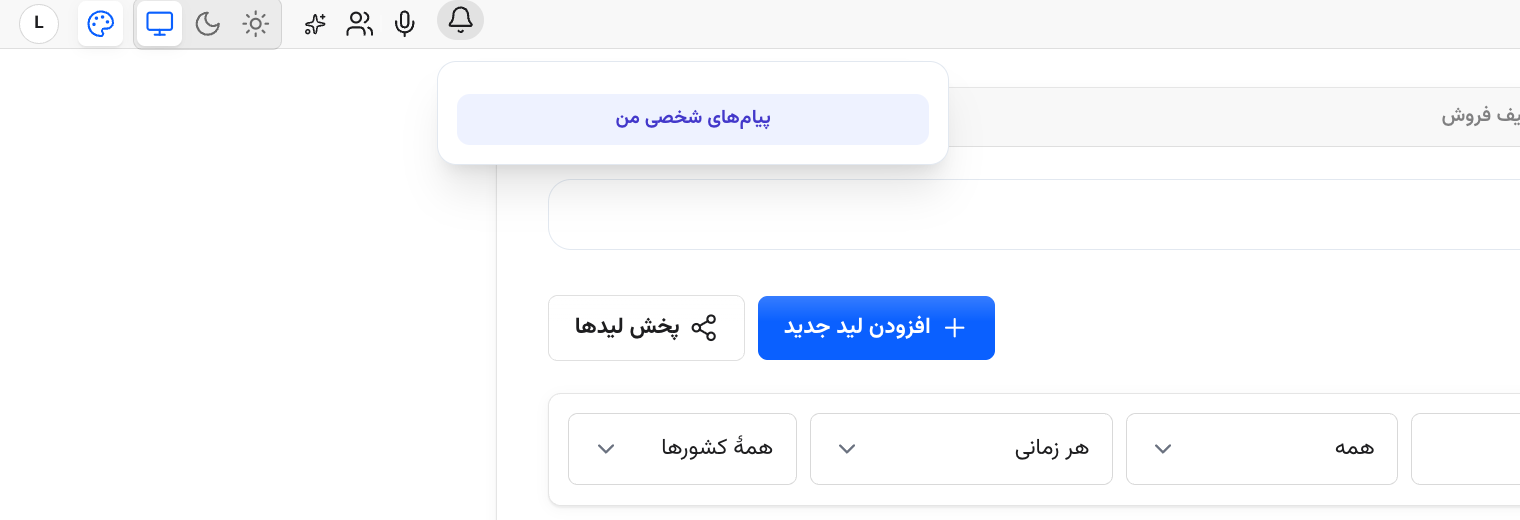
The bell in the macOS skin's top bar

How to use it

  1. Click the bell in the top bar.
  2. See overdue follow-ups and alerts, or click "My messages" to open every message.

More from the blog

Product update

A shorter, tidier phone menu

The phone menu is no longer four screens of tiles. The section you are in stands open and every other section is one row with its icon and count. Search leads the menu and the foot is one row.

Product update

The sidebar menu is on the first screen

The welcome card and \"Worth a look\" are one row each now, section headings wear icons, and a section you open stays open. \"My messages\" left the middle of the page: its bell sits beside the voice button in the sidebar.

Product update

A lighter, faster panel

Every panel page is up to half its old size and far less work for the browser. Icons come once per page, and the menus of skins you are not using are no longer drawn. Nothing looks different.

Missing something?

Tell us what to build next. Most of what is announced here started as somebody’s suggestion.

Suggest a feature